Architecture
This document describes the 2.0 crate map, the layering rules, the time model and the render/audio/export data flow. The authority for these rules is issue #156.
Crate map
| Crate | Owns |
|---|---|
core | Plain project data (Project, Track, Clip, ClipKind, Transform, Animation), exact timeline arithmetic (Time, FrameRate), the Command mutation API with undo/redo, and pure evaluate(&Project, Time) -> Scene. Effects are plain data (EffectInstance: plugin id + effect id + numeric params); the EffectProcessor port is how the renderer asks a plugin host to run one. No IO, GPU, decoder or UI dependencies. |
format | Versioned project.json (schema version 7) and content-addressed .amio ZIP containers. Stream APIs support custom storage; filesystem save helpers validate and atomically replace targets using synced temporary files in the same directory. |
render | Deterministic, GPU-free Vello CPU backend (the reference for tests and export), the clip-effect chain mechanics (rasterize a clip layer, hand each effect to the context's EffectProcessor, composite), an optional gpu feature with a Vello/wgpu GpuBackend for preview, embedded font shaping, the engine ResourcePool, Frame (RGBA8), PNG encoding and PNG/JPEG decoding. Also the shared sample demo project and the FrameSource video seam. |
audio | Engine-owned audio pools (one seekable PcmReader per asset; nothing holds a whole decoded asset), lazy block-wise resampling and channel mapping behind an LRU-budgeted cache, immutable mixer snapshots, Opus/Symphonia decoding, and cpal/rtrb device playback. No audio resources live in Project. Also pure offline beat detection (detect_beats). |
media | FilmCraft decode behind the MediaBackend trait (probe, frame-exact video seek, audio PCM), an LRU-budgeted engine MediaPool with prefetch, and the H.264 + AAC Mp4Encoder (BT.709-tagged). Untrusted-input limits (dimensions, frame counts, rates, checked arithmetic) are enforced before codec work. |
export | Deterministic offline MP4 export: steps render(evaluate(project, t)) frame by frame plus the audio mixer, encoded with Mp4Encoder. Never a recording of playback. |
transcribe | Local automatic subtitles: whisper.cpp speech recognition behind the opt-in whisper cargo feature (whisper.cpp through the whisper-rs bindings; needs cmake, a C++ toolchain and libclang), on-demand SHA-256-verified model downloads with resumable atomic writes, 16 kHz mono audio preparation on top of audio, pure cue splitting (line/duration/overlap rules) and SRT/WebVTT reading and writing. Everything but the engine works without the feature. |
control | Local JSON-RPC 2.0 control protocol over a user-only socket/named pipe: methods (including export), token auth, headless handler and client. |
plugin-api | The WIT world (crates/plugin-api/wit/plugin.wit), the plugin.toml manifest format, .amplugin package (zip of plugin.toml + plugin.wasm), the inspector schema, guest SDK and first-party clip authoring helpers (sources). |
plugin-host | wasmtime Component Model runtime: loading/compiling plugins, the sandbox (fuel, epoch, memory, output caps), host imports (shape-text, svg-to-paths, typeset-math, limits, log, and read-sibling for importers), ABI 1.1.0 (1.0.0 components load unchanged) plus an explicit 0.2.x adapter, plugin scene resolution, pixel-effect plugins (PluginHost::effects, effect_processor: instance-pre cached components, a fresh fuel/memory/epoch-limited store per call, frame-size caps), animation presets (PluginHost::animation_presets, animation_preset_command) and importers (PluginHost::importers, PluginHost::import). |
typeset | Host-side math typesetting: Typst as a library plus MiTeX for LaTeX→Typst conversion, turned into vector path outlines plus a tight bbox. |
import-v1 | One-way importer for v1 .animathio projects (deflated JSON + base64 media). Still native (see "Importers" below). |
import-manim | One-way importer for Manim Community scene scripts (.py), parsed with a small pure-Rust Python parser (pyparse) whose node vocabulary follows tree-sitter-python. The app runs it only inside the org.animathio.import-manim importer plugin. |
apps/animathio-cli | Headless validation, PNG rendering, MP4 export, importers and the MCP sidecar. |
apps/animathio | The GPUI desktop editor: a thin view over the command-only core, plus an export worker and dialog. |
plugins/* | Standalone first-party WebAssembly plugins: shapes, text, latex, graph, effects-basic, audio-basic, animations (animation presets), import-manim (Manim importer), trap (sandbox fixture), and examples/hello. |
Video clips decode through render::FrameSource via the media crate's
MediaPool, so real video frames appear in preview, the CLI and headless
renders. export encodes MP4 (H.264 + AAC, BT.709-tagged) offline. WebM export
and an FFmpeg fallback backend remain future work; MediaBackend is shaped so a
second backend can be added without touching callers.
Layering
Dependencies point inward. The core owns its domain types and exposes no
&mut outside command application; the UI and control layers change state only
through Commands.
flowchart TD
    UI[apps/animathio · apps/animathio-cli] --> CTL[control]
    CTL --> IMP[import-v1]
    CTL --> RENDER[render]
    CTL --> AUDIO[audio]
    CTL --> EXPORT[export]
    RENDER --> MEDIA[media]
    EXPORT --> RENDER
    EXPORT --> MEDIA
    EXPORT --> AUDIO
    MEDIA --> AUDIO
    IMP --> FORMAT[format]
    CTL --> FORMAT
    FORMAT --> CORE[core]
    AUDIO --> CORE
    MEDIA --> CORE
    RENDER --> CORE
    EXPORT --> CORE
    CTL --> HOST[plugin-host]
    HOST --> API[plugin-api · WIT/SDK]
    HOST --> TYPESET[typeset]
    HOST --> CORE
    TYPESET --> CORE
render and export share media; export additionally uses audio's mixer
and render's rasterizer, and media reuses audio's Symphonia decode for
non-indexed audio assets. Every crate bottoms out in core.
Rules that keep the layers honest:
corehas no IO/GPU/decoder deps.Projectcontains no runtime resources.format,render,audio,media,export,import-v1,import-manim,controlandplugin-hostall depend oncoreand never the reverse.controlsits aboveformat/render/export/import-v1so the MCP sidecar can load, mutate, render, export and import headlessly without the editor. Manim import and animation presets reachcontrolonly throughplugin-host;import-manimis compiled into theplugins/import-manimcomponent, not linked into the apps.- Third-party crates (FilmCraft, vello, GPUI) stay behind adapter boundaries;
no third-party type leaks into
core.
Desktop editor foundations
editor_env.rs supplies production defaults and a headless test environment (monotonic
playback clock, CPU preview, built plugins or no plugins, private settings/cache paths).
editor/ui_tests mounts the real editor in gpui's test window and exercises actions and
shared panel handlers, asserting project and view state without devices or pixel snapshots.
apps/animathio/src/editor.rs owns view state and composes implementation modules
under editor/: menus, workspace, viewer, transport, timeline_view,
fields, audio_effects (inspector audio-effect cards), animations (the inspector
Animations section and the Effects-tab preset library), video_effects (inspector video-effect cards), inspector_view, media_pool, math (Math tab, typed object dialog and inspector), titles (Titles tab), dialogs, export_panel
(export queue popover), start_screen, templates, clip_ops, commands, project_io,
control_bridge, playback_glue, timeline_thumbnails and actions. Shared drawing/resource helpers live in
support; color_edit owns the live-preview transaction (colour pickers, sliders,
number scrubbing and the viewer's transform gizmo all preview through it, so one
gesture is one history entry). The gizmo maths in viewer shares the renderer's
canvas mapping and builds its edit with inspector::transform_edit_commands, which
merges plain properties into one SetTransform and keyframes animated ones. editing.rs holds pure
shuttle, in/out, blade and ripple command planning. In/out points and tool mode stay
in view state. Ripple trim uses one Command::Batch on the source track;
Shift+Delete uses RippleDelete. The ruler and export range share half-open bounds.
The audio device clock stays master at every shuttle speed; with no output device a signed
monotonic clock stands in.
Audible shuttle lives in crates/audio (Speed, BlockGenerator, varispeed).
Player::set_speed restarts the session at the latency-corrected position like a seek.
Timeline painting uses GPUI canvas quads/paths and culls clips before building
labels or requesting previews. A separate timeline_thumbnails worker decodes
five source-time samples per visible video clip, resizes them to low-resolution
BGRA tiles and repeats one tile for still images. Keys include asset, source time
and track height; the queue holds 16 requests and the UI retains at most 256 tiles.
The worker keeps at most eight video decoders and eight small still images.
Waveforms reuse the editor's cached 4096-peak audio summaries and a bounded cache
of 128 paint-ready paths, invalidated by clip geometry, zoom, scroll or window
position changes. These resources
never enter the project model. The overview uses only lightweight clip ranges;
zoom interpolates view state over the design token's 180ms motion duration.
The mixer worker (never the device callback) renders blocks: it mixes the timeline span a
block covers and resamples it by the signed rate with linear interpolation, carrying the
fractional position so blocks join seamlessly. Negative speeds read backwards, so the block
is the reversed PCM. Forward up to 8x and reverse up to 4x are audible (pitch follows
speed); faster rates push silence. The callback's clock is origin + frames * speed
computed with a rational speed (reverse counts down), so video stays exact at each rate.
Half-speed K+J/K+L jog uses Speed::HALF.
Exports run through export_queue: each job owns a project snapshot, jobs run sequentially
on the export worker (crates/export honours the cancel flag through its progress
callback and leaves no partial file), and the editor polls the queue to drive the Export
queue popover and toasts. Control-protocol exports appear in the same queue.
start_screen provides project presets, recents and importer entry points.
templates supplies launcher cards, the placeholder fill dialog and user-library save/delete.
Template manifests stay outside the project schema; source replacements are ordinary
undoable command batches. Media fitting uses the typed Clip::fit field in both
rendering backends. Workflow
dialogs use gpui-component forms; export works on an immutable snapshot, so selecting
a delivery preset does not change the open project. control::ExportPreset is the
shared table for editor, CLI and MCP. Preferences persist under the application
config directory (preferences.json, renderer selection in preview.json), the
main-window geometry (window-state.json, written atomically from a debounced
save, with display UUID and display-local position; restored on that display or
the primary if disconnected, clamped to its usable area; maximized sessions retain
the initial restore size) and never enter project serialization.
The actions module registers GPUI actions and a contextual keymap (Editor,
Timeline, Viewer, Inspector, MediaPool). secondary- bindings are resolved
with GPUI's OS-aware loader: Cmd on macOS and Ctrl elsewhere. App menus and button
tooltips read hints from those bindings. Text and numeric inputs own their editing
keys, clipboard, selection and IME; timeline Delete/Space never intercept a focused
input. The Help menu opens the shortcut reference.
The workspace uses horizontal and vertical resizable panel groups. Sizes, visibility
and S/M/L track density (28/44/72 logical pixels) persist in dock-layout.json under
the application config directory. Older files default to medium tracks. Headers and
clips share a vertical scroll surface, so every track remains accessible. Wheel
scrolls vertically; Alt+wheel scrolls horizontally; Ctrl/Cmd+wheel zooms.
Chrome uses the active dark theme, a 12 px base and monospaced timecodes. A single
custom title bar hosts the application menus, project/dirty state, control-server
status and Export. The status bar contains project output settings, duration and
autosave age. Transient errors, information and successful work use typed
notifications hosted by Root.
A colour drag applies Commands for immediate preview. On pointer release, it
restores the original value with the inverse command and records the final command
once in History. Other commands and control calls finish a pending drag first,
so a colour change undoes in one step without swallowing adjacent edits. Asset
parameter selectors display names but commit asset identities (or null for None).
Time model (integer ticks)
AniMathIO 2.0 uses integer ticks at a fixed rate, with rational frame rates on top. The rate is 705,600,000 ticks per second — the flicks constant, chosen so frame and audio-sample boundaries are always exact:
TICKS_PER_SECOND = 705_600_000
It is divisible by 24, 25, 30, 50, 60, 120, the NTSC numerators 24000/30000/60000/
120000 (so 23.976, 29.97, 59.94 and 119.88 fps are exact), and the audio rates
44100/48000/96000/192000. An i64 of ticks still spans over 400 years in either
direction. Code and CLI flags call the unit "ticks"; the underlying rate is the
flicks rate.
Time(i64)— a signed tick position. Negative values are allowed for intermediate math.FrameRate { numerator, denominator }— a positive, reduced rational rate.frame_to_time(frame, rounding)andtime_to_frame(time, rounding)convert with an explicitRoundingpolicy (Floor,Ceil,Nearest) so rational frame boundaries that fall between ticks are never silently rounded.TimeRange { start, end }— a half-open[start, end)nonnegative interval.
The core model stores no f64 seconds and no absolute pixels. Transform is
resolution-independent (position/scale are fractions of the canvas, rotation is
radians, opacity is [0, 1]). Pixel conversion happens only at the render/UI
boundary.
Engine rules from #156
Each rule exists because of a specific v1 failure, and each is enforced by a test.
| v1 failure | 2.0 rule | Enforced by |
|---|---|---|
Live Konva nodes, <video>/<audio> elements and AudioContext source nodes stored next to project data; leaked contexts and silent preview after export. | The project is plain data. Decoders, GPU textures and audio streams live in an engine-owned resource pool keyed by asset hash. Removing a clip never has to release anything. | core has no IO/GPU deps; after deleting every clip and running GC the pool is empty. |
| Animations in a separate anime.js timeline seeked in parallel with the store. | Animated values are always computed from (project, t) and never kept in a second stateful object. Keyframes are data. | Property test: rendering at t is independent of which times were rendered or seeked before. |
Playback on Date.now() + rAF while each media element kept its own clock. | One clock: the audio device clock. Video asks "which frame is due now?" and is never corrected after drifting. No f64 seconds anywhere. | Exported A/V offset is within ±½ frame across the sample corpus. |
| Export recorded the canvas in real time, so every playback bug ended up in the file. | Export steps the same render path frame by frame. Never a recording, never tied to the wall clock. | Golden tests: export frame N equals preview frame N. |
| ~98 forwarded store members; any component could change anything. | Each piece of state has exactly one owner. The UI holds only view state and changes the engine only through Commands. | ui depends on core's public API only; core types expose no &mut outside command application. |
Commands
core::Command is an exhaustive enum of serializable, invertible edits:
AddTrack, RemoveTrack, SetTrackGain, SetTrackMuted, SetTrackSolo,
SetTrackLocked, RenameTrack, MoveTrack, AddAsset, RemoveAsset,
SetSettings, AddClip, RemoveClip, MoveClip, TrimClip, SplitClip,
MergeClip, SetTransform, SetClipFit, SetParam, AddEffect, RemoveEffect,
MoveEffect, SetEffectParam, SetEffectBypass, SetPluginParam, AddKeyframe, RemoveKeyframe, MoveKeyframe,
AddTransition, RemoveTransition, SetTransitionDuration, AddMarker, RemoveMarker,
MoveMarker, UpdateMarker, Batch, SplitAt,
RemoveRange, RippleDelete, plus the link-group variants SetClipLink and RestoreClips
and Exact (replays one inverse edit without link propagation).
Track flags: a muted track is silent in the mixer and skipped by evaluate;
while any track is soloed only soloed tracks are mixed and rendered (solo beats
mute). A locked track rejects every clip-level edit (AddClip, RemoveClip,
MoveClip, TrimClip, SplitClip, MergeClip, transform/param/effect and
keyframe commands) in Command::apply itself, so the editor, the control
protocol and MCP all see the same track N is locked error; layer-level
commands (gain, mute, solo, lock) always work so a track can be unlocked.
MoveClip also refuses a locked destination track. Inside a Batch each member is
checked against the locks as the earlier members left them, so a batch may unlock a
track and then edit it but cannot lock one and then edit it. Undo and redo replay
recorded history without the lock check (locks guard new edits, not history).
SplitAt, RemoveRange and RippleDelete also refuse locked tracks. RemoveRange
re-bases the keyframes of a clip whose head it removes, exactly as a split does, so
fades and animations on the kept part stay where they were on screen.
RenameTrack and MoveTrack { id, index } (the track's position after the move) are
layer-level, so they work on locked tracks too. The editor's multi-clip edits (grouped
move, nudge, delete, paste, duplicate, linked ripple) are plain Batches planned by the
window-free selection, clipboard and ripple modules of the app crate, so each is one
undo step and is replayable over the control protocol.
Batch { commands } applies its members atomically as one undo step
(at most 1024 members); fades are a Batch of AddKeyframes on a
clip's gain (audio) or opacity (everything else).
Command::apply(&mut Project) -> Result<Command> validates the candidate project
transactionally and returns the exact inverse, so undo/redo, the control protocol,
MCP and plugins all funnel through one API. A failed edit leaves the project
unchanged.
Transitions
Transitions live on the Track (transitions, serde default empty) and sit on the
edit point between two adjacent clips: Transition { id, kind, duration, from, to }
where from.range.end == to.range.start. This was chosen over per-clip
transition-in/out fields because one record per cut cannot disagree with itself
and clips stay non-overlapping in the model. The window [cut - d/2, cut + d - d/2)
is centred on the cut; evaluate extends the outgoing clip past its end and starts
the incoming clip early (its source time is clamped at zero), and both
SceneClips carry the same SceneTransition { id, kind, progress, role }.
Validation requires both clips on the transition's track, adjacency, a positive duration, one transition per cut, and that each clip covers the halves of the transitions on both of its edges. Edits that break adjacency (move, trim, split, remove) are rejected until the transition is removed.
The CPU backend renders both sides into canvas layers (effects and opacity
applied) and blends them: premultiplied linear mix for CrossDissolve, through an
opaque black/white frame for DipToBlack/DipToWhite, and rectangular clip
layers for Wipe { direction }. The audio mixer extends cross-dissolved audio clips
across the window with equal-power gains (cos/sin of p·π/2); other kinds keep
a hard audio cut, and an incoming clip without a source handle is silent before
its source start.
Data flow
flowchart LR
    subgraph load["load"]
        A[.amio / project.json] --> B[format::read_*]
        B --> C[Bundle: project + assets]
        C --> D[RenderCtx::ResourcePool]
        C --> E[audio::AudioPool]
    end

    subgraph edit["edit"]
        F[UI / CLI / MCP] -->|Command| G[core::Command::apply]
        G --> H[(Project)]
        G -->|inverse| I[undo/redo history]
    end

    subgraph preview["preview / render"]
        H --> J[core::evaluate Project, Time]
        J --> K[Scene: active clips + evaluated transforms/params]
        K --> L[plugin-host::resolve]
        L --> K
        K --> M[render::render Scene, ResourcePool, size]
        M --> N[Frame RGBA8]
        N --> O[PNG / viewport]
    end

    subgraph audio["audio"]
        H --> P[AudioPool::prepare rate, channels]
        P --> Q[Mixer::mix project, range]
        Q --> R[Player / ring buffer / device clock]
    end

    subgraph export["export"]
        H --> S[export::Exporter::export]
        S --> T[render(evaluate(project, t)) per frame]
        S --> U[Mixer::mix per inter-frame block]
        T --> V[media::Mp4Encoder]
        U --> V
        V --> W[out.mp4]
    end
- Load.
format::read_amio/read_jsonproduce aBundle(validatedProjectplus content-addressed asset bytes keyed by BLAKE3). The CLI moves asset bytes intoRenderCtx::ResourcePool; the editor additionally feedsaudio::AudioPool. - Edit. Every mutation is a
Command::apply.Projectstays plain data; nothing evaluated is cached inside it. - Evaluate.
core::evaluate(&Project, Time)selects the active clips (half-open ranges, back-to-front track order) and samples keyframes into aSceneofSceneClips — transforms and typed params resolved at that instant, independently of seek order. - Resolve plugins. The plugin host replaces
ClipKind::Pluginclips withClipKind::Vectorscenes by running the sandboxed component; missing/trapped plugins becomeClipKind::Errorwithout crashing the host. The headless CLI renders unresolved plugin clips as placeholders. - Render.
render::render(&Scene, &mut RenderCtx, size)rasterizes back-to-front with the Vello CPU backend into a tightly packed straight-alpha RGBA8Frame(capped at 32 megapixels). The same call serves preview and frame-stepped export. Export and tests always use the CPU backend. The editor preview usesGpuBackend(Vello compute on a headless wgpu device, texture readback to RGBA8) whenpreview_backend(BackendKind::Gpu)finds a hardware adapter (software adapters such as WARP or llvmpipe are rejected), and falls back to CPU with the reason otherwise or when a GPU render fails. Clips with effects are rasterized, run through the effect plugins (the sameEffectProcessorpath as the CPU backend) and composited by the GPU backend as an image.render_previewis the preview-only entry point: a clip whose effect cannot run (missing plugin, rejected parameters) is drawn without that effect and reported inPreviewFrame::effect_failures, so the editor keeps its warning badge/toast instead of a black frame, while export and tests userender, which fails withError::Effect. - Audio. Assets stream.
AudioPool::insertopens a seekablePcmReader(SymphoniaSourcefor files,Pcmfor in-memory samples) andAudioPool::prepare(rate, channels)only plans the output format.Mixer::mix(project, range), shared by preview and export, decodes, resamples and channel-maps fixed blocks on demand into an LRU cache with a byte budget (PrepareOptions), so memory is independent of media length (a one-hour stereo 48 kHz asset mixes in a few megabytes) and the output is a pure function of the project and sources: the FFT resampler's one-chunk overlap lets a block start one chunk early, giving exactly the whole-asset result for any range or cache state. Decoding restarts per 2^21-frame segment from a recorded packet after a quarter-second pre-roll, so it too is history independent. Opus (Ogg, Matroska, MP4) is decoded by the pure-Rust FilmCraft Opus decoder (thefilmcraft_opuscrate).ChannelMatrixmaps layouts (ITU-R BS.775 fold-down to stereo, mono duplication, stereo mean).Playerconsumes the ring buffer and updates the latency-corrected master clock. The device callback only consumes the ring;Player::now()is quantized to callbacks and freezes on underflow. Clip and track audio-effect chains run insideMixer::mix(see Audio effects). - Export. Export steps the render path frame by frame —
render(evaluate(project, t))per frame plus the audio mixer's snapshot for each inter-frame block — and encodes withmedia::Mp4Encoder. It is never a recording of playback.
Audio effects
Audio effects mirror the pixel-effect design: the model owns plain data, a plugin owns the
DSP, and a port in core connects them.
- Model.
Clip::audio_effectsandTrack::audio_effectsare ordered chains ofEffectInstance { id, plugin, effect, params, bypass }. Effect ids are unique within a clip (across its video and audio chains, soTarget::Effectkeyframes address either unambiguously) or within a track. Chains are edited only throughCommand::{AddAudioEffect, RemoveAudioEffect, MoveAudioEffect, SetAudioEffectParam, SetAudioEffectBypass}addressed byAudioChain::{Clip(id), Track(id)}; every command returns its exact inverse. Track-chain edits, like gain and mute, work on locked tracks. Schema 4 introduced the fields (formatmigrates 3 → 4 without changes; fields absent mean "no effects"). - Signal flow. Per clip: source → clip
gain/muted→ clip chain → dissolve fades; per track: sum of clips → track chain → track gain; then the sum of tracks. A clip's chain parameters may be keyframed (Target::Effect) and are sampled at the start of each block; track chains use their base parameters. Bypassed effects are skipped but keep their parameters; video effects bypass the same way (Command::SetEffectBypass, dropped byevaluateand ignored by the renderer). The editor passes audio through an effect whose plugin is missing or fails with a warning toast, while export fails strictly. A project without active chains takes the original per-frame path unchanged (bit-identical output). - Port.
core::AudioEffectProcessortakes(EffectInstance, AudioBlock, state)and returns processed samples plus the next state blob.plugin-host'sAudioEffectHandleimplements it over theaudio-effect-pluginworld (pooled warm instances, fuel/epoch/ memory limits, see plugins.md); the mixer receives it throughMixer::with_effect_processor, the exporter throughExporter::set_audio_effect_processor, and the editor registers one for playback.Mixer::dry()ignores all chains for analyses such as silence detection. - Determinism. Effects need state across blocks, yet
mixmust stay a pure function of(project, range)that any caller may slice any way. The mixer therefore processes each chain on a fixed lattice of 2048-frame blocks. Within a 64-block segment the state flows exactly from block to block; the state entering a segment is defined as the state reached after a fresh run over the preceding second of audio (or nothing at a clip's first block). Whether blocks come from a cache or are recomputed, the result is identical, so preview, export, seeks andmixcalls over adjacent ranges agree bit-for-bit. A bounded (96 MiB) LRU of processed blocks, shared by mixer clones, makes sequential playback and export cost one pass of each chain; a cold seek costs at most one segment plus the warm-up. - Failures. A missing, trapping or over-limit effect plugin follows the video-effect
policy. The default (strict) mixer used by export fails with an error naming the effect;
the preview mixer (
Mixer::lenient) skips the failing effect so the audio passes through it unprocessed, records a warning in anEffectWarningssink (the editor shows a toast) and does not cache the affected blocks. - Threading. Plugin calls happen only in the mixer worker or the export thread. The device callback still only pops the ring: it allocates nothing and takes no lock.
- Cost. Measured through the sandbox with pooled instances, 2048-frame blocks, 48 kHz
stereo, per second of audio on a shared development machine (debug profile, optimized
dependencies;
cargo test -p animathio-plugin-host --features test-support --test audio_effects -- --ignored --nocapture bench_audio):gain1.3 ms,highpass1.9 ms,eq32.7 ms,gate3.2 ms,compressor3.7 ms,voice_cleanup6.5 ms (denoise, added later, is not in this table; it runs one 512-point FFT pair per channel per 128 frames and is included in thebench_audiorun). Even a stack of every effect is well under 2 % of real time; the state warm-up adds about a third on top while a chain is played sequentially from a cold segment.
Typed parameter animation
ParamValue owns numbers (f64), linear-light straight-alpha RGBA colours
(f32 channels in [0, 1]), resolution-independent 2D points, booleans, enum
choices, strings, and optional content-addressed asset references. Clip::params
and evaluated SceneClip::params contain typed values; each Animation stores
Keyframes<ParamValue>. Transform and effect targets still require
numbers. Validation rejects nonfinite values, mixed-type curves, and curves whose
type differs from their typed base parameter. Plugin curves may also target an
implicit schema default without a stored base value.
Every native clip source and every non-null typed asset reference in clip parameters
or keyframes must exist in the project asset manifest, including keys outside the
trimmed clip range. RemoveAsset and batches that leave dangling references fail
transactionally; JSON and archive writers apply the same model validation. Effect
parameters (video and audio) are numeric only, and typed values have no nested
containers. Save helpers omit cached bytes absent from the manifest while keeping
the caller's cache available for undo.
Numbers, points, and colours support linear, smoothstep ease-in/out, and hold interpolation. Colour RGB channels interpolate in linear light (not sRGB byte space), with alpha interpolated separately. Booleans, enum choices, strings, and asset references always hold, regardless of the outgoing interpolation setting. Exact key times return their stored values, and sampling outside a curve clamps to its endpoints.
Serde accepts legacy bare numeric base values and keyframe values as
ParamValue::Number; new saves use tagged variants. This is a compatible read
extension to schema version 1. Opaque ClipKind::Plugin::params is preserved
verbatim. SetPluginParam sets/removes typed overrides in Clip::params; removing
an override exposes the original opaque value. The plugin host merges evaluated
typed overrides over opaque defaults, inferring legacy JSON types from the declared
schema and preserving the variants of typed values, converting
linear-light colours to the plugin API's sRGB bytes. The cache hashes typed values
including their variants.
Every plugin inspector control has a keyframe diamond. Editing an animated parameter updates the key at the playhead or inserts one there, preserving an existing key's outgoing interpolation. Unanimated edits update base parameters.
Animation presets
Presets (fade, slide, zoom, pop, spin, bounce, wipe, typewriter, breathe, shake,
hop, flash) come from the org.animathio.animations plugin on the API 1.1
animation-preset-plugin world; there is no preset table in the core or the apps.
PluginHost::animation_preset_command places the window (in at the clip start, out
at its end, emphasis centred), samples the clip's current values at the window's
rest point, calls the plugin's generate once, validates the returned curves
(known targets, in-window strictly increasing times, finite values, a key budget)
and returns one Command::Batch: RemoveKeyframe for each existing key of an
animated target inside the window, then AddKeyframe for every generated key. The
result is ordinary keyframes, so rendering, export and saved projects never depend
on the plugin, and one undo restores the previous keys exactly. Easings that core
keyframes cannot interpolate natively (ease-in/out, back, bounce, elastic) are
sampled by the plugin into linear segments. The typewriter presets keyframe the
text plugin's reveal parameter (the fraction of characters shown). The control
methods animations.list/animations.apply, the MCP tool apply_animation_preset,
the CLI animations subcommand and the editor's inspector section all go through
this one function (animathio_control::animation_preset_command).
Importers
The Manim importer runs inside the org.animathio.import-manim plugin on the API
1.1 importer-plugin world. PluginHost::import hands it the script bytes and,
only when the caller grants a directory (the script's folder), bounded
read-sibling reads for ImageMobject files. The plugin answers with a
version-1 command document, Project::rebuild_commands of the imported project,
which the host replays on an empty project through the validating
Command::apply; every returned asset must hash to its id and be registered.
import.manim, the MCP import_manim_scene tool, animathio-cli import-manim and
the editor's Manim dialog all use animathio_control::import_manim_with_plugin.
The v1 importer stays native for now: its embedded media inflates to as much as
2 GiB, more than a wasm32 importer sandbox can hold, so moving it needs streamed
asset hand-off first.
Text and shape sources
Text and shapes are ClipKind::Plugin sources with IDs org.animathio.text and
org.animathio.shapes. Their parameters and geometry belong to the components;
core has no builtin source variants or source-specific validation. The optional
Rust constructors in plugin-api::sources create ordinary plugin payloads.
The editor inspector reads their declared schemas and applies typed parameters
through commands. CLI PNG renders, sequences, MP4 exports and headless control
resolve evaluated scenes through the same plugin host as preview.
The generic vector interchange supports Canvas pixel coordinates and Normalized
unit-square coordinates. Normalized paths, strokes and text scale with the clip;
normalized text font size is relative to canvas height and is laid out with the
embedded font, wrapping and alignment shared by CPU and GPU. The laid-out text block
is centred on the clip position (media-style anchoring), so a text clip at the default
transform sits in the middle of the canvas. A renderer sees only
resolved vector drawing instructions, never text/shapes plugin IDs.
Schema 2 writes plugin clips. format migrates schema-1 builtin text, rectangles,
ellipses and arbitrary quadratic/cubic paths, preserving local stroke widths,
fill/outline transparency, transforms, source offsets, keyframes and effects.
Legacy domain types and their validation exist only in the format reader. Existing
plugin payloads remain opaque and untouched.
Effects
A clip's effect chain is Vec<EffectInstance>; each instance names a plugin and one
of its filters (plugin: "org.animathio.effects-basic", effect: "grayscale") plus
keyframeable numeric parameters. core validates only identifiers and finiteness —
parameter names, ranges and defaults belong to the plugin, which publishes them through
list-effects so the editor menus, the Effects tab and the MCP list_effects tool show
exactly what the loaded plugins provide. Because core cannot know ranges, command
producers check them: the editor, the control socket and MCP call
PluginHost::validate_effect_command before applying AddEffect, SetEffectParam and
effect keyframes, and reject unknown or out-of-range values. Undo/redo (Exact) is exempt
so history can never block. A value that is already stored out of range (hand-edited or
old project) is clamped to the declared range when the effect runs, with a warning, instead
of failing every frame.
The inspector's Effects section shows one editable card per effect (editor/video_effects.rs,
built from the same card model as the audio-effect cards): a bypass switch, move up/down
(Command::MoveEffect), remove (RemoveEffect, batched with RemoveKeyframe for a keyframed
effect so one undo restores both), and for each declared parameter a slider over the plugin's
min..max, a scrub label, typed entry, a reset-to-default button and a keyframe diamond.
Edits are clamped to the declared range and go through inspector::numeric_edit_command: a
keyframed parameter gets a Target::Effect keyframe at the playhead, otherwise SetEffectParam
sets the base value. Slider and scrub drags preview live through color_edit (one undo step on
release). The add buttons and the Effects library drop both use add_effect_to_clip. A card
shows a warning when its plugin is not loaded or the last preview frame failed inside the
clip's chain. Effect parameters are numeric in the plugin descriptor, so there are no colour,
enum or bool controls yet. The timeline shows every keyframe of the selected clip, effect
keyframes included.
Rendering stays a pure function of the project. A backend rasterizes a clip with effects
alone into a canvas-sized straight-alpha sRGB RGBA8 layer, then render::effects hands
each instance, in order, to the RenderCtx's EffectProcessor (ctx.set_effect_processor;
PluginHost::effect_processor() returns the implementation) and composites the result.
The CPU reference and the GPU preview use this same path. A clip with effects but no
processor, a missing plugin, a rejected parameter or a sandbox violation fails the frame
with render::Error::Effect; the frame is never silently rendered unfiltered.
The eight former builtins (grayscale, sepia, invert, saturate, brightness,
contrast, blur, opacity) are the first-party org.animathio.effects-basic plugin
(plugins/effects-basic). Schema-2 projects migrate by mapping the old kind to the
plugin id and a lower-case effect id; parameter names are unchanged. Light handling is
documented in the plugin source: color filters run in linear light, invert on encoded
channels, blur on premultiplied linear light.
Plugin effect calls are host-bounded: frames above 16 Mpx are rejected, fuel scales with
the pixel count, the memory ceiling is 64 MiB plus 48 bytes per pixel (at most 1 GiB), and
the epoch deadline is ~10 s. See docs/plugins.md.
Integration tests use plugin-host's test-support feature to build text, shapes and effects
for wasm32-wasip2 with a shared target directory and resource limits. Subprocess
CLI tests receive an explicit bundle directory. CI builds bundles on both Linux
and Windows; the WASI target must be installed for local tests too.
Clips optionally carry a serialized link_group. Move, trim, split, delete and ripple-delete propagate to companions transactionally; split halves get separate groups. Undo uses Command::Exact to replay individual inverse edits without propagating them twice. Trim applies the start/end/source-offset deltas to companions (a misaligned pair stays misaligned), MergeClip merges the companion pair too (and refuses to merge a linked clip with an unlinked one), and all offset arithmetic is checked. The editor lists only one member per link group when it splits a multi-selection, and an all-tracks ripple delete also ripples the companions' tracks. Generated inverses (SplitAt, RemoveRange, RippleDelete) longer than the 1024-command Batch cap are nested into chunks, so undo of a large edit always works; a history entry that fails to apply is dropped instead of blocking earlier undos. SetClipLink changes membership; the editor Unlink menu action clears the whole group in one batch. Locked companion tracks reject the complete edit.
Offline export renders and mixes on its caller while an encoder worker consumes owned RGBA/PCM buffers through a channel with capacity one. Frame and audio order are unchanged; progress reports only encoded frames. The worker is joined on success, failure and cancellation. Output remains atomic, and a serial/pipelined MP4 comparison test protects byte determinism.
The per-frame colour conversions on the export path (decoded YUV to RGBA, and RGBA to
the encoder's 4:2:0) use byte-indexed lookup tables and avoid libm round, with unit
tests asserting bit-for-bit equality with the direct formulas. The RGBA-to-YUV step
splits the frame into bands of luma-row pairs across at most four scoped threads; each
band uses identical arithmetic, so output does not depend on the thread count.
Title preset composition is owned by control, outside the core. Embedded JSON
specifies text, shapes and LaTeX layers, integer ramp durations and explicit
entry/resting/exit transform curves (absolute, offset or scale factor). The shared
builder returns one Command::Batch and a fresh link group; it stores no runtime
resources in the project. _title_preset / _title_field are opaque plugin JSON
metadata for the editor's grouped text inspector. CPU library thumbnails are
rendered off-thread and cached in editor session state by project canvas size.
Automatic subtitles
crates/transcribe turns speech into editable captions without leaving the machine.
- Engine: whisper.cpp through the whisper-rs bindings was chosen over a pure-Rust
candleWhisper. It is several times faster on CPU for thetiny/basemodels, ships the complete decoder (language detection, hallucination suppression, token timestamps) and loads one ggml file per model. Its cost is a C++ build, so it sits behind thewhispercargo feature (animathio-transcribe,animathio-control,animathio-cliandanimathioforward it). Default builds and the default test run need no cmake and no model; CI builds and tests the feature once on Linux and Windows. - Models:
tiny(78 MB),base(148 MB, default) andsmall(488 MB) multilingual ggml models from theggerganov/whisper.cppHugging Face repository. Nothing is bundled. A download needs explicit consent (editor Generate button,animathio-cli models --download, MCPdownload_model: true), streams into<file>.part(resumed with an HTTPRangerequest), is checked against a pinned size and SHA-256 and only then renamed into<user data dir>/models/whisper(ANIMATHIO_MODEL_DIRoverrides it). An absent model is an offline error that says how to get it. - Pipeline:
prepare::mix_selectionmixes the dry audio of a clip, a track, a range or the whole project to 16 kHz mono throughAudioPool/Mixer(so gain, mute and track gain apply and effects do not), the engine produces segments with word timings, andcues::split_segmentsmakes cues of at most two 42-character lines, 0.8 to 6 seconds each, broken at sentence ends and pauses and never overlapping.control::subtitle_commandbuilds oneCommand::Batchwith two new tracks,Subtitles(text) overSubtitles background(bars), one linked pair per cue using the Caption bar title preset, so undo removes everything in one step. - Caption styles:
control::captionsholds the bundled styles (classic,"word-highlight",karaoke,pop,"one-word","bold-outline"). A style is a set oforg.animathio.textclip parameters (caption_style,words,accent,outline,outline_width,max_words,font_size,color, fit box) plus a safe-area placement, so the format schema is untouched.Cue::wordscarries Whisper's per-word timings (SRT/WebVTT imports spread the words evenly over the cue) andsubtitle_commandstores them clip-relative in thewordsparameter. The text plugin renders the active word, pill, fill or pop scale as a pure function of the clip's source time, so preview and export agree (golden frames incrates/render/tests/captions.rs).Call::SubtitlesStyle(subtitles.style,set_caption_style) and the editor's caption picker restyle existing captions through oneCommand::BatchofSetPluginParam/SetTransformand bar add/remove commands. The editor'scaption_stylesmodule is the shared picker (Generate dialog and the caption inspector section). It offers free text/accent colour pickers and named user presets saved under the editor config directory (caption-presets). Presets save, apply and delete looks without changing the project schema. Inspector caption text edits preserve timings of unchanged words and distribute inserted words between their neighbours, committing text and timings in one undoable batch. - Threading: the whole job is blocking and CPU-bound. The editor runs it on a worker
thread (the app's
subtitle_jobmodule, with thesubtitleseditor module for the dialog, popover and control calls) with a progress phase and a cancel flag that whisper.cpp polls, shows it in a status-bar popover in the export-queue style and applies the cues on the UI thread; control clients get their reply when it finishes.
Markers and beat sync
- Model.
Project::markers()is a list ofMarker { id, time, duration?, name, color, note }kept sorted by(time, id);timeanddurationare integer ticks andcoloris one of the eight-entryMarkerColorpalette. Markers never affect rendering or export. They change only throughCommand::{AddMarker, RemoveMarker, MoveMarker, UpdateMarker}(each returns its exact inverse, all work insideCommand::Batch, and markers are never blocked by a locked track). Schema 5 introduced themarkerskey (formatmigrates 4 → 5 without changes; a missing key means no markers). - Ripple and markers.
RemoveRange(withripple),RemoveRangeOnTracksandRippleDeletecarry amarkers: MarkerRipplefield (auto,rideorstay; absent =auto, so older serialized commands keep working). When markers ride, the marker updates areUpdateMarkers generated inside the same command, so one undo restores clips and markers exactly. A marker at or after the end of the removed range moves left by its length; a marker inside the range collapses onto the cut point (it is kept, never deleted); a range marker that spans the cut shrinks by the removed length and one whose end falls inside the range is clipped at the cut, becoming a point marker when nothing is left.autorides when no track outside the rippled set has content after the cut (so always forRemoveRange, and for the all-track autocut),staynever does. The editor's ripple delete and ripple trim (ripple::delete_command/trim_command) use the same rule throughMarkerRipple::rides,ripple_marker_commandsandripple_marker_insert_commands; Timeline > "Markers follow ripple" switchesautotostay. - Source limits. The core model is resource free and does not know how long a media asset
is, so it cannot refuse a clip that reads past its media. The control layer's
SourceLimits(probed durations) does: an edit may not push a video or audio clip's source end (source_offset + length) further out than it was and past the end of its media.HeadlessHandler(CLI, MCP, socket) and the editor check every command withSourceLimits::guardbefore running it, andsync_cuts_commandchecks every roll edit, skipping and reporting the ones that cannot fit. Stills, generated clips and media whose duration is unknown are unbounded; shortening, moving and splitting never extend a source. New clips (AddClip) are not checked: importers place them with the probed duration. - Beat detection lives in
audio(detect_beats,downbeat_indices): pure, offline and deterministic over mono samples, with no extra dependencies. Onset strength is a log-compressed spectral flux (a small radix-2 FFT), the tempo is the peak of an autocorrelation weighted towards moderate tempi, beats come from a dynamic-programming tracker (Ellis 2007) and each beat is refined to the sharpest attack at sample resolution. Downbeats are the phase of the beat grid with the most onset strength. The audio comes from the transcription audio-preparation adapter (Mixer::dry, 16 kHz mono, so clip and track gain apply and effect chains are ignored), for the whole mix or one clip, track or range. - Sync actions live in the control layer's
beatshelper, shared by the editor, CLI and MCP:markers_at_beats_command(every beat, every Nth beat or downbeats only; idempotent) andsync_cuts_command, which snaps the selected clips' cut points to the nearest beat or marker withinmax_shiftas roll edits (both clips at a shared cut move, source content stays put, linked companions follow through the normal link propagation) or splits clips at the targets. Each builds oneCommand::Batch; edits that would overlap, collapse a clip or touch a locked track are skipped and reported. Edits are rounded to the frame grid unlessframe_alignis off. - Chapters. The control layer's
chaptershelper turns the markers into a chapter list (a YouTube-styleM:SS Titleblock,WebVTTchapters or FFmpeg;FFMETADATA1), shared by the CLI (markers chapters,export --chapters), the control methodchapters.exportand MCPexport_chapters. The MP4 muxer (the media backend) has no chapter atom and patchingmoovwould shift every chunk offset, so chapters ship as sidecars;ffmpeg -i v.mp4 -i chapters.ffmeta -map_metadata 1 -codec copy out.mp4embeds them without re-encoding. - Editor. The
markerseditor module owns the panel, the marker dialog and the ruler flags (painted bysupport);timelinemakes markers snap targets and hit-tests them. Markers are selected on the ruler (click, Shift/Ctrl-click toggles, drag moves the whole selection); Delete removes, the arrow keys nudge by a frame (Shift: ten) and Ctrl+C / Ctrl+V copy and paste them at the playhead. The pure plans live inmarker_edit.
Automatic cuts live in the control layer's autocut helper, shared by the editor,
CLI and MCP. The legacy silence-trimming helper calls the same detector. Analysis
uses the transcription audio-preparation adapter; pure silence and word-timestamp
logic need no speech engine. Review drafts carry a project content hash and no model
state is stored in the project. Command::RemoveRangeOnTracks reuses range-removal
logic with explicit track scope and validates companion closure and locks. Reverse
ordered range commands are wrapped in one serializable batch for undo/redo.
The editor's autocut module owns ephemeral review state, cancellable background
analysis, sliders, per-cut toggles and timeline overlays.
Auto-ducking (crates/control/src/ducking.rs) is control-layer analysis shared by the
editor, CLI (duck) and MCP (auto_duck): voice activity from the autocut silence detector
over the dry transcription mix, merged regions, then clip-local gain keyframes applied as
one Command::Batch, targeting the union of selected audio clips and whole music tracks
(see Auto-ducking). The editor's ducking module owns
the ephemeral review state (voice/music pickers, sliders, background analysis, timeline overlay of
the ducked spans). The denoise audio effect is
streaming spectral gating inside org.animathio.audio-basic; its noise profile is a
per-bin minimum over ~1 s of smoothed power, so its memory is about as long as the mixer's
state warm-up; whatever the warm-up leaves, the output stays a pure function of the project.
It adds 512 frames of latency, which the mixer compensates for clip and track chains
(declared through a host-side first-party table, since ABI 1.x descriptors cannot carry
latency; see docs/plugins.md), so delayed audio stays aligned with the timeline and no
tail is lost at clip ends.
Auto-reframe
The control layer's reframe helper owns deterministic low-resolution saliency,
scene-change resets, a dead zone and rate-limited follow, path simplification and
a snapshot-guarded command batch. Existing media decoders sample video in source
time, including trims. The editor's reframe module owns settings and a worker
with atomic progress/cancel; the CLI and MCP use the same helper. No runtime
tracking state is stored in the project and the format schema is unchanged.
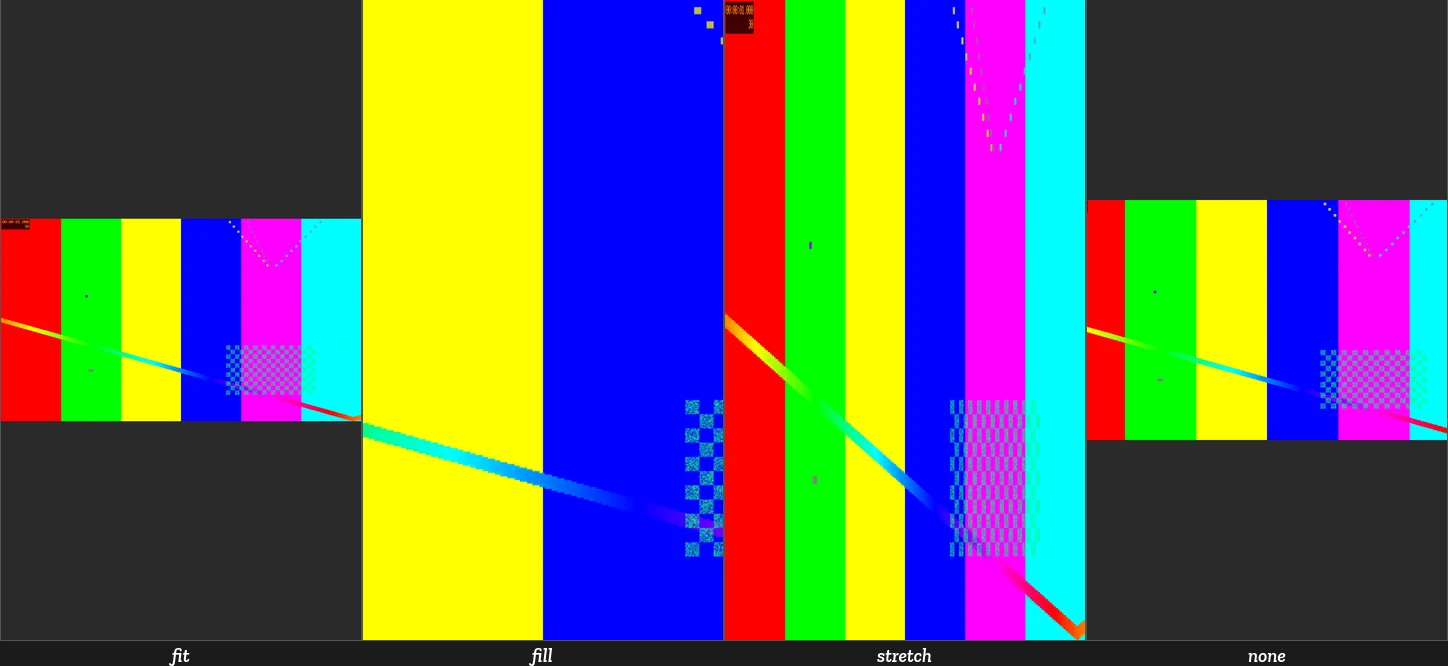
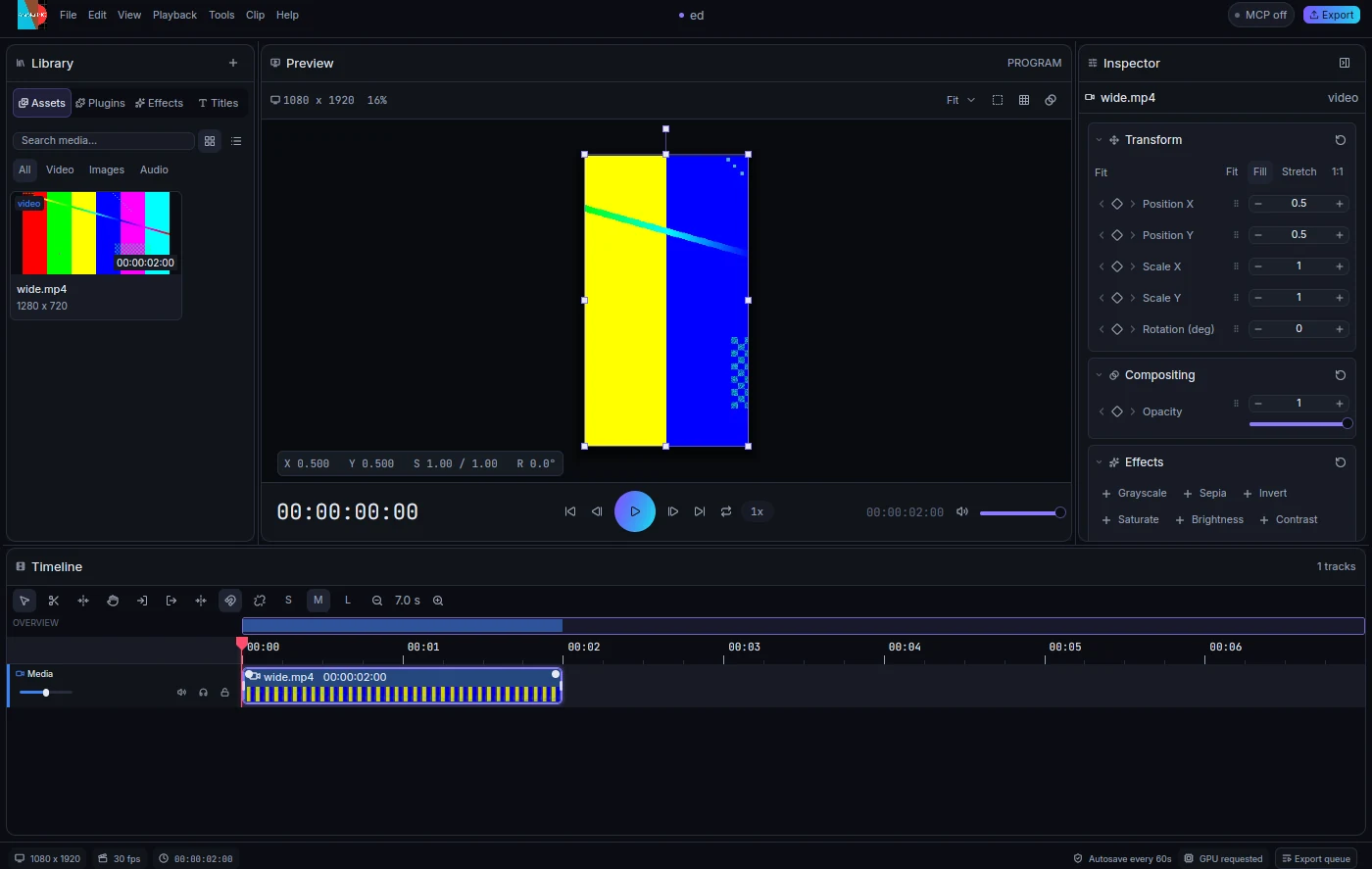
Image and video clips created with Clip::new default to Fit::Contain (Fit).
Fit::Cover (Fill) crops to the clip frame, Fit::Stretch distorts to that frame,
and Fit::Original (1:1) uses source pixels at the project resolution before the
clip transform. Fitting respects the physical aspect of a transformed placeholder;
CPU, GPU, picking, gizmos and timeline filmstrips share Fit::rect and
Fit::visible_rect. Contain/cover use the physical target aspect, preserving
aspect even with rounded preview dimensions or output size overrides. The project resolution travels with Scene::canvas, so a
smaller preview keeps the same 1:1 framing as export. The inspector Transform
section edits fit through SetClipFit.
A 16:9 clip in a 9:16 project, rendered in each mode (media-fit-modes.png: fit
letterboxes, fill crops, stretch distorts, none is 1:1) and the inspector Fit control
with the gizmo following the fitted bounds (editor-media-fit.png):
Schema 6 migrates earlier media clips to stretch to preserve their appearance.
Schema-5 template media_fit parameters are promoted to Clip::fit and removed;
contain/cover template placement is unchanged. New files write the selected fit.
No existing pixel golden needs regeneration for this migration.
External command.apply requests reject Exact and RestoreClips, recursively
inside batches. Internal template edits and recorded history still use these
primitives. MergeClip requires timeline adjacency, source-time continuity and
identical kind, transform, fit, parameters and effects. The right automation must
equal the left automation rebased at the join, as a split would produce; otherwise
the merge is refused atomically. Undo restores both complete clip snapshots.
Inspector inputs commit to their captured clip ids before selection changes drop
the field pool. A multi-file media import (including a newly needed track and
linked audio) is one Command::Batch; successfully prepared files share one undo
step, failed files report an error, and an entirely failed import adds no track.
K release is captured before focused inputs can consume it; leaving the editor focus
subtree or deactivating its window clears the held-key state. The MCP status chip distinguishes disabled control from startup failure and shows
the failure in a tooltip; startup errors are also logged.
Clip retiming
Schema 7 adds Clip::time_map (ClipTimeMap); schema 6 migrates to an identity
clock through serde defaults. ClipSpeed stores reduced rationals exactly on a
millionth-speed lattice, bounded to 1/16–16x. SpeedPoint keys use local timeline
ticks, ordered strictly, at most 128. A linear rate curve holds its first/last
rate outside the keys. Its trapezoid integral uses i128 integers, with a single
floor to source ticks at lookup; duration is the first timeline tick whose
integral consumes the original source span. Nonidentity clocks have a maximum
seven-day timeline/curve span to bound arithmetic. No floating-point time enters
the mapping. Percent is only a display conversion.
Command::SetClipSpeed preserves each linked clip's half-open source interval
and changes its timeline duration. Animation keys remain at their existing local
timeline times (keys beyond a shortened end are retained). Clip::source_time
is used by evaluation, so CPU/GPU preview, exports and FrameSource all read the
same clock. Reverse starts at the exclusive source end minus one tick. Splits
and head trims retain the original curve phase, so their source samples stay
continuous; merge accepts true split pairs only. The source-limit guards use
mapped source bounds. Extending a retimed clip past its retained source interval
is rejected; reset/retime the interval instead. Retimed transition handles clamp
to the retained interval.
Linked companions receive the same speed/direction/curve. With ripple: false,
trailing clips stay in place and any overlap rejects the whole transaction. With
ripple: true, clips starting at or after the old end shift on every unlocked
track. Misaligned companions whose durations would change by different amounts
reject a ripple retime. Locked companions block either edit; locked unrelated
tracks stay fixed. Markers and explicit project duration stay fixed. Existing
transitions must remain valid or the edit is rejected. Undo restores complete
clip snapshots, including source clocks and automation.
Command::InsertFrameHold builds freeze_frame_command, one Command::Batch
that splits at a playhead inside the clip (including its start), inserts N project
frames reading that source frame, and ripples the tail and unlocked trailing
clips. Each linked pair gets independently linked head, hold and tail segments.
Audio holds are silent. Other clips spanning the insertion point are unchanged.
The mixer samples the same source clock on its existing output block lattice, with linear sample interpolation for retimed audio, in either direction. This is varispeed: pitch changes with speed. Maintain-pitch stretching and antialias filtering for large speedups are deferred. Identity clocks keep the existing bit-exact mixer path. Clip effects run after retiming; track effects run after mixing, and all output remains independent of seek order.
The editor's retime module provides the Speed inspector section and exact
percentage/frame-key parsing. The Speed/Duration dialog accepts constant speed,
duration or ramp keys; editing duration quantizes the implied ratio to a millionth
(and may differ by a tick/frame boundary). Existing subframe ramp keys survive an
unchanged dialog submission. Ctrl+R opens the dialog from the timeline; the Rate
Stretch tool and graphical ramp handles are deferred. The CLI's
animathio-cli set-clip-speed and animathio-cli freeze-frame and the MCP tools
route through the shared commands and source-limit guards.
Mathematical object workflow
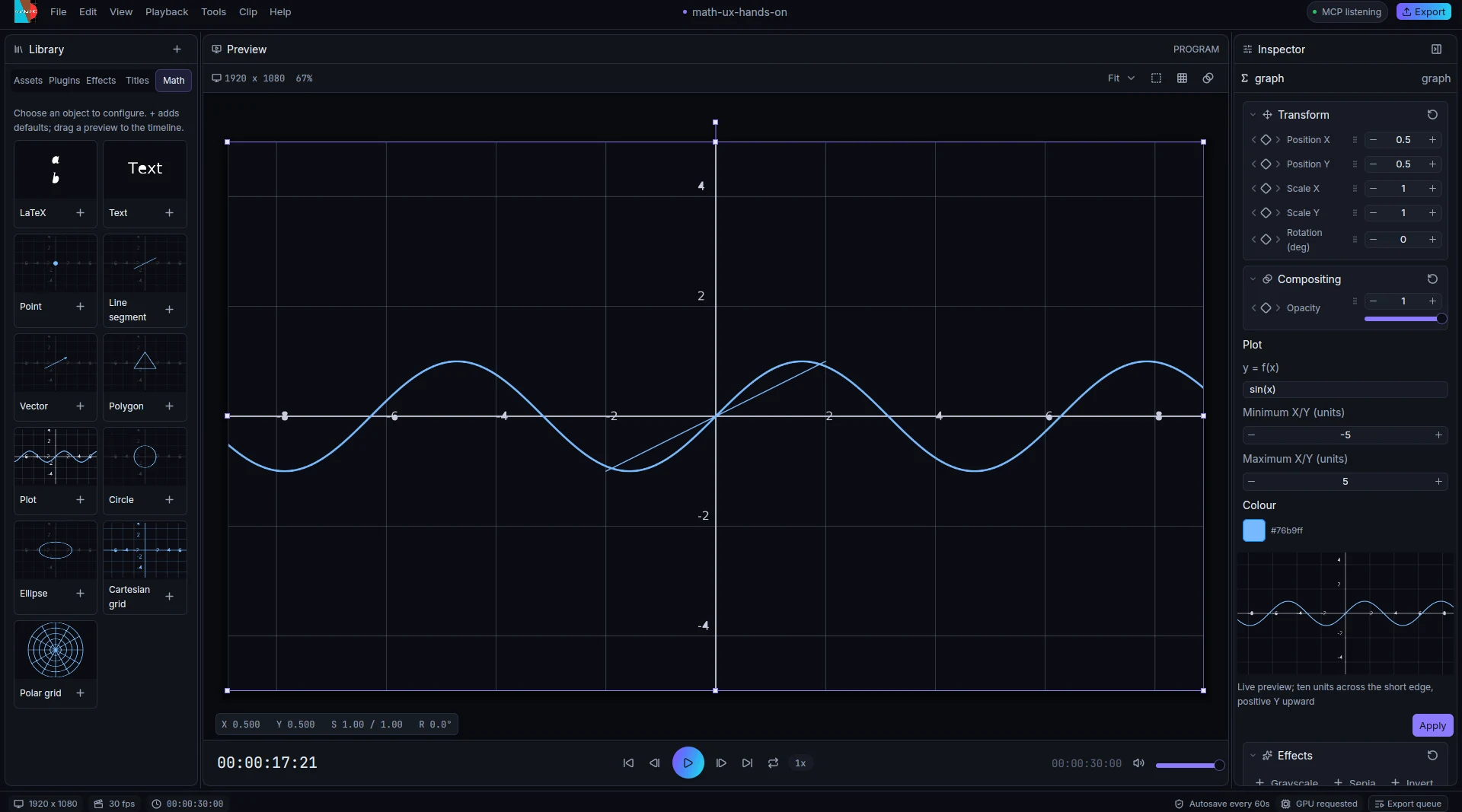
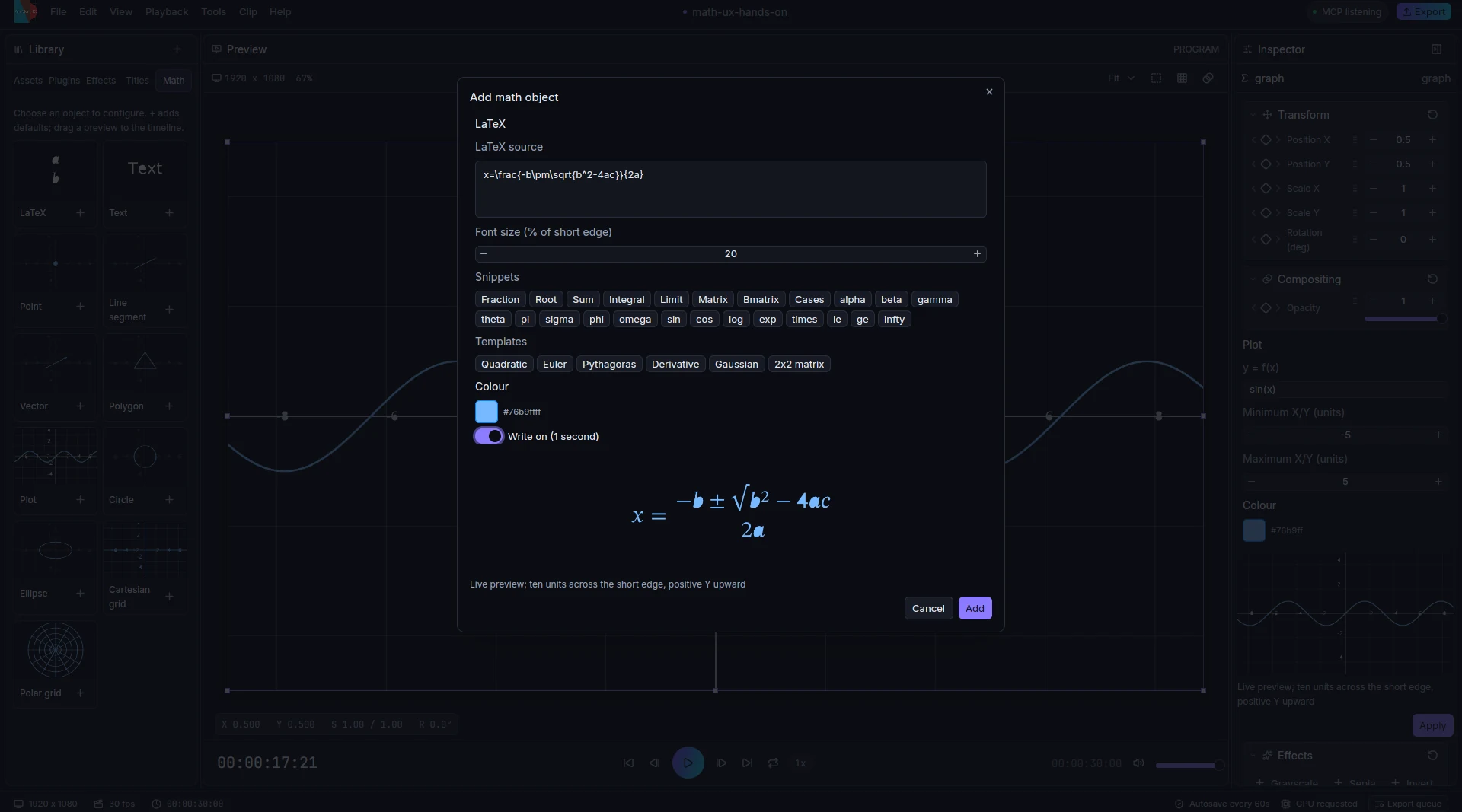
The library's Math tab offers LaTeX, Text, Point, Line segment, Vector, Polygon, Plot, Circle, Ellipse, Cartesian grid and Polar grid. Click a preview card to configure it; the plus button adds defaults at the playhead, and dragging its preview to the timeline adds defaults at the drop time. Placement uses a free visual layer. Double-click a math clip in the timeline or on its visible ink in the viewer to reopen the same editor. The inspector presents the same labelled fields; Apply commits the draft as one undoable batch.
crates/control/src/math_objects.rs owns the object catalogue, field definitions,
validation and command mapping. Geometry uses math units (a ten-unit square,
positive Y upward), scaled uniformly from the short canvas edge. Text and LaTeX
sizes use a percentage of the short edge. Shape paths and polar grid paths go through
the shapes plugin; function plots and labelled Cartesian grids go through graph. The editable definition is
stored in plugin metadata, with typed overrides for subsequent edits. Effects,
transforms, timeline placement and existing keyframes survive Apply. No format
schema fields are added. Legacy LaTeX clips also open in this editor; Typst clips
keep their generated inspector.
Preview renders on a background worker through the real plugins and CPU render path, after a 250 ms debounce. Results carry generations so older work cannot replace a newer draft. Library previews are cached for the editor session. Drafts never mutate the project until Add or Apply. The LaTeX editor inserts snippets at the caret and offers six formula templates, colour, relative font size and a Write on toggle for new clips, using the animation plugin's typewriter entrance preset. Plugin errors appear inline and disable Add/Apply. The cards and fields follow the interface text scale; the dialog widens with UI scale and bounds its scrolling form to leave the preview and action buttons visible.
Scene cuts
scene_detector shares the sampled luminance detector with reframe, preserving its default thresholds. scenes decodes source frames through the media backend at 4 Hz, maps cuts to the project frame grid and stores a snapshot-bound review draft. The editor scenes module runs analysis on a cancellable worker. Application validates the snapshot, simulates linked splits on a scratch project and returns one nested batch. No format change.
Evaluated scenes carry the project’s straight-alpha sRGB background. Both render backends paint it before clips; preview, PNG rendering and video export share this policy. New default projects remain transparent; templates retain their configured backgrounds. Math input nesting is limited to 64 levels and native typesetting workers use an explicit 64 MiB stack.